Category: Blog

  • energiapro_gas_consumption

    hacs_badge

    This repo or its code author is not affiliated with EnergiaPro.

    HACS configuration

    Make sure that you have the AppDaemon discovery and tracking enabled for HACS.

    Breaking change, new way to get data

    Over the past few months, EnergiaPro has introduced changes to their customer portal, the latest being CloudFlare Turnstile, an invisible reCaptcha mechanism to prevent automated bot to do… what I was doing :-/ Even though legit requests, this service detects bot activity and login will not work.

    EnergiaPro now has an (unadvertised) API

    But all is not lost. While not advertised, there is an API available!

    Until EnergiaPro officializes and socializes the API, you can reach out to them at clients@energiapro.ch to get more information for the API service and ultimately get the new set of credentials to make this AppDaemon work.

    Energiapro pre-requisite

    • Your gas installation is already equipped with EnergiaPro’s LoraWan equipement.
    • You possess API login credentials.

    If you are not equipped with the LoraWan stuff, you should be able to contact EnergiaPro and request its installation and configuration at no charge.

    You will need to have the following information for configuration:

    • Your installation number, which you can find in the customer portal or on your invoice.
      • As you configure this number for this app, the format looks like 123456.000
    • Your client number, which you can find on your invoice
      • The format is more like 123456

    AppDaemon’s python packages pre-requisites

    Make sure you have the following python packages installed:

    • (deprecated, can be removed for use with the API) xlrd
    • (deprecated, can be removed for use with the API) pandas
    • (deprecated, can be removed for use with the API) beautifulsoup4
    • requests
    • bcrypt

    Configuration

    secrets.yaml

    You will need the following in your secrets.yaml file

    (deprecated, can be removed for use with the API) energiapro_email: <YOUR_EMAIL>
    (deprecated, can be removed for use with the API) energiapro_password: <YOUR_PASSWORD>
    energiapro_installation_number: "<YOUR_INSTALLATION_NUMBER>"
    energiapro_client_number: "<YOUR_CLIENT_NUMBER>"
    energiapro_bearer_token: <HA_LONG_LIVE_TOKEN>
    energiapro_api_base_url: "https://web2.holdigaz.ch/espace-client-api/api/"
    energiapro_api_username: "<API USER NUMBER>"
    energiapro_api_secret_seed: "<SECRET COMMUNICATED TO YOU BY ENERGIAPRO>"
    

    Don’t forget to put your installation number between double quotes to avoid yaml truncating it.

    apps.yaml

    Define your app like the following. You can remove the deprecated secrets per the above too.

    energiapro_gas_consumption:
      module: energiapro_gas
      class: EnergiaproGasConsumption
      energiapro_base_url: https://www.holdigaz.ch/espace-client
      # energiapro_email: !secret energiapro_email
      # energiapro_password: !secret energiapro_password
      energiapro_bearer_token: !secret energiapro_bearer_token
      energiapro_installation_number: !secret energiapro_installation_number
      energiapro_client_number: !secret energiapro_client_number
      energiapro_api_username: !secret energiapro_api_username
      energiapro_api_base_url: !secret energiapro_api_base_url
      energiapro_api_secret_seed: !secret energiapro_api_secret_seed
      # ha_url: http://localhost:8123  # optional, in case hassplugin ha_url undefined
    

    The energiapro_bearer_token refers to a long-lived Home Assistant token, to post the result.

    Manually trigger the app

    The app can register an endpoint at energiapro_gas_consumption, which was mainly used during development. It’s been commented for “production”.

    If you want to trigger a run manually, uncomment the necessary line in the initialize method and you then can call that endpoint, such as:

    $ curl -XPOST -i -H "Content-Type: application/json"  http://<YOUR_APPDAEMON_IP>:<YOUR_APPDAEMON_PORT>/api/appdaemon/energiapro_gas_consumption -d '{"action": "Call of Duty"}'
    

    Troubleshhoting

    No error, but no data either

    • Make sure you’ve configured your installation number within double quotes and that it is the right number.

    TODO:

    • how to backdate for previous day? (e.g. come up with good SQL probably)
    • Load historical data

    Visit original content creator repository

  • sight-scala

    sight-scala Scala CIcodecov

    Scala client library for Sight APIs. The Sight API is a text recognition service.

    Scala 3.0.0

    Dependency

    libraryDependencies += "io.github.ashwinbhaskar" %% "sight-client" % "0.1.2"
    

    Scala 2.13.4 / 2.13.5

    Dependency

    scalacOptions += "-Ytasty-reader",
    libraryDependencies += "io.github.ashwinbhaskar" % "sight-client_3.0.0-RC3" % "0.1.2"
    

    API Key

    Grap an APIKey from the Sight Dashboard

    Code

    1. One Shot: If your files contain a lot of pages then this will take some time as this will return only after all the pages have been processed. Use the function recognize as shown below.

      import sight.client.SightClient
      import sight.Types.APIKey
      import sight.models.Pages
      import sight.adt.Error
      
      val apiKey: Either[Error, APIKey] = APIKey("xxxxxxxx-xxxx-xxxx-xxxx-xxxxxxxxxxxx")
      val files: Seq[String] = Seq("/user/john.doe/foo.pdf","/user/john.doe/baz/bmp")
      val result: Either[Error, Pages] = apiKey.flatMap(key => SightClient(key).recognize(files))
      
      /*
      Helper extension methods to inspect the reesult
      Note: Extension methods will not work with Scala 2.13.4 and 2.13.5
      */
      import sight.extensions._
      val allTxt: Either[Error, Seq[String]] = result.map(_.allText)
      val allTxtGt: Either[Error, Seq[String]] = result.map(_.allTextWithConfidenceGreaterThan(0.2))
      
    2. Stream: You can choose to get pages as and when they are processed. So this returns a LazySequence which can be consumed as a bunch of pages are processed. Use the function recognizeStream as shown below.

      import sight.Types.APIKey
      import sight.models.Page
      import sight.adt.Error
      import sight.client.SightClient
      
      val apiKey: Either[Error, APIKey] = APIKey("xxxxxxxx-xxxx-xxxx-xxxx-xxxxxxxxxxxx")
      val files = Seq("/user/john.doe/foo.pdf","/user/john.doe/baz/bmp")Downloads/flight-euro.pdf")
      apiKey match
          case Right(k) => 
              val result: LazyList[Either[Error, Seq[Page]]] = SightClient(k).recognizeStream(files)
              result.foreach(println)
          case Left(error) => println(e)
      

    Official API Documentation

    Here is the official API Documentation

    Visit original content creator repository
  • slack-clone

    Getting Started with Create React App

    This project was bootstrapped with Create React App.

    Available Scripts

    In the project directory, you can run:

    npm start

    Runs the app in the development mode.
    Open http://localhost:3000 to view it in your browser.

    The page will reload when you make changes.
    You may also see any lint errors in the console.

    npm test

    Launches the test runner in the interactive watch mode.
    See the section about running tests for more information.

    npm run build

    Builds the app for production to the build folder.
    It correctly bundles React in production mode and optimizes the build for the best performance.

    The build is minified and the filenames include the hashes.
    Your app is ready to be deployed!

    See the section about deployment for more information.

    npm run eject

    Note: this is a one-way operation. Once you eject, you can’t go back!

    If you aren’t satisfied with the build tool and configuration choices, you can eject at any time. This command will remove the single build dependency from your project.

    Instead, it will copy all the configuration files and the transitive dependencies (webpack, Babel, ESLint, etc) right into your project so you have full control over them. All of the commands except eject will still work, but they will point to the copied scripts so you can tweak them. At this point you’re on your own.

    You don’t have to ever use eject. The curated feature set is suitable for small and middle deployments, and you shouldn’t feel obligated to use this feature. However we understand that this tool wouldn’t be useful if you couldn’t customize it when you are ready for it.

    Learn More

    You can learn more in the Create React App documentation.

    To learn React, check out the React documentation.

    Code Splitting

    This section has moved here: https://facebook.github.io/create-react-app/docs/code-splitting

    Analyzing the Bundle Size

    This section has moved here: https://facebook.github.io/create-react-app/docs/analyzing-the-bundle-size

    Making a Progressive Web App

    This section has moved here: https://facebook.github.io/create-react-app/docs/making-a-progressive-web-app

    Advanced Configuration

    This section has moved here: https://facebook.github.io/create-react-app/docs/advanced-configuration

    Deployment

    This section has moved here: https://facebook.github.io/create-react-app/docs/deployment

    npm run build fails to minify

    This section has moved here: https://facebook.github.io/create-react-app/docs/troubleshooting#npm-run-build-fails-to-minify

    Visit original content creator repository

  • kitodo-presentation

    Kitodo.Presentation

    Kitodo.Presentation is a feature-rich framework for building a METS- or IIIF-based digital library. It is part of the Kitodo Digital Library Suite.

    Kitodo.Presentation is highly customizable via a user-friendly backend and flexible design templates. Since it is based on the great free and open source Content Management System TYPO3, it integrates perfectly with your website and can easily be managed by editors. Kitodo.Presentation provides a comprehensive toolset covering all requirements for presenting digitized media. It implements international standards such as IIIF Image API, IIIF Presentation API, OAI Protocol for Metadata Harvesting, METS, MODS, TEI, ALTO, and can be configured to support any other descriptive XML format using simple XPath expressions. With Kitodo.Presentation you can publish digitized books, manuscripts, periodicals, newspapers, archival materials, 3D objects, audio and video.

    For a complete overview of all features, visit the Kitodo homepage.

    Kitodo was formerly known as Goobi. Older releases can be found on Launchpad.

    Requirements

    Kitodo.Presentation requires TYPO3 v12 or TYPO3 v13. Additionally, Apache Solr v8.11 – v9.7 with solr-ocrhighlighting v0.9.1+ are required as search engine backend.

    Application level dependencies are handled by Composer (see composer.json).

    Kitodo. Digital Library Modules

    Kitodo is an open source software suite intended to support the digitisation of cultural assets for libraries, archives, museums, and documentation centres of all sizes. A range of modules with open interfaces support the production, presentation, and archiving of digital assets. The software can be flexibly used for a multitude of digitisation strategies and scalable business models – for in-house projects, purely corporate services, or hybrid endeavours. Kitodo is backed and continually updated by a dynamic user and developer community and the non-profit association Kitodo e. V.

    Information | Communication | Support

    For general information and news, please visit our website.

    As a system that has to meet the diverse requirements of a wide variety of institutions and the materials they want to digitise, Kitodo is a rather complex software solution, the installation and configuration of which can be challenging, especially for users with limited IT capacities and know-how.

    To ensure it can best advise and assist users on technical and organisational issues, the Kitodo community has established support structures for the following typical scenarios.

    1. Users who have clearly defined questions relating to the use and development of Kitodo or Kitodo modules are well-served by the Kitodo mailing list. They will typically receive helpful answers from the community or the Kitodo release managers within a short period of time. If this should be unsuccessful for any reason, the Kitodo association office will address your matter to an experienced member institution. You do not need to be a member of the association to use the mailing list.
    2. For users who occasionally need more extensive advice and possibly also on-site practical assistance for Kitodo installation, workflow modelling, etc., the Kitodo office maintains a list of voluntary mentors. Requests can be directed to these proven experts from various libraries by the association office. More information is available from the association office.
    3. For institutions that would like an initial and extensive introduction to Kitodo in the form of a product presentation or ongoing support, in particular on-site, we are happy to provide a list of companies that to the best of our knowledge have already worked in these fields. To obtain the company list, please also use the association office address. Please bear in mind that the association cannot provide further assistance in selecting service providers.

    Getting started

    Visit original content creator repository

  • webperf-toolkit

    Web Performance Toolkit

    Collection of open-source tools for web performance testing and optimization.

    This list appeared as a logical continuation of load-testing-toolkit collection but for web performance and real user experience monitoring.

    Tools

    In alphabetical order.

    • autowebperf – A flexible and scalable framework for running web performance audits with arbitrary audit tools including PageSpeed Insights, WebPageTest and more.
    • boomerang – A JavaScript library that measures the page load time experienced by real users.
    • browser-perf – A Node.js based tool for measuring browser performance metrics.
    • browsertime – A harness to automate running JavaScript in your browser primary used to collect performance metrics.
    • garie – An out-the-box web performance toolkit that provides pre-configured dashboards, tooling and historic reporting to understand applications web performance.
    • lighthouse – An automated tool analyzes web apps and web pages, collecting modern performance metrics and insights on developer best practices.
    • overlooker – Frontend performance profiling tool.
    • perfectum – A set of tools for performance audit via measuring client/synthetic performance metrics.
    • performance-budgets – A solution built with Docker and lighthouse to capture and set budgets on a given website.
    • perftools-runner – Web frontend to run simultaneously several of Google’s performance tools (lighthouse, PageSpeed Insights, WebPageTest) against an URL, all at once, using puppeteer.
    • phantomas – Phantom.js-based web performance metrics collector and monitoring tool.
    • psi – PageSpeed Insights Reporting for Node.js.
    • puppeteer-webperf – Automating web performance testing with puppeteer, a Node.js library which provides a high-level API to control headless Chrome or Chromium over the DevTools Protocol.
    • pwmetrics – Progressive Web Metrics, a CLI tool and library to gather performance metrics via lighthouse.
    • sitespeed.io – A complete web performance tool to measure the performance of website.
    • speedlify – Benchmark the web performance and accessibility of sites over time.
    • speedracer – Collect performance metrics for your library/application.
    • speedscope – A fast, interactive web-based viewer for performance profiles.
    • timeline-viewer – DevTools Timeline Viewer provides shareable URLs for Chrome DevTools performance traces.
    • webpagetest – A performance measurement tool to test website speed from around the globe using real browsers at consumer connection speeds with detailed optimization recommendations.
    • web-tracing-framework – Google’s tools for instrumenting, analyzing, and visualizing web apps.
    • yellowlab.tools – A web performance and front-end quality testing tool using phantomas.
    • yslow – Analyze web pages and suggest ways to improve their performance based on Yahoo!’s set of rules for high performance web pages.

    Related

    Visit original content creator repository

  • mwb-layout

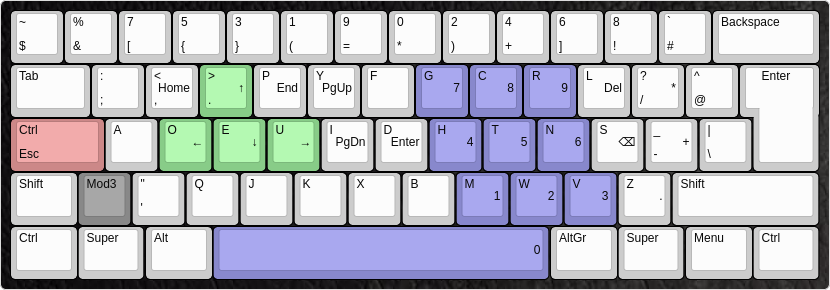
    alt tag
    Preview of the mwb-layout (programmer dvorak variant). It was designed to be used on ISO keyboards (Mod3-key).

    Notable features

    • Arrow keys on the left side of the home row
    • Numpad on the right side
    • Navigation keys like Home, End, PgUp and PgDn are easy to acces

    Installing the X11 keymap

    Installation in your $HOME:

    mkdir -p ~/.xkb/symbols/
    cp mwb ~/.xkb/symbols/
    

    To enable it:

    setxkbmap -I ~/.xkb mwb -print | xkbcomp -I$HOME/.xkb - $DISPLAY
    

    Systemwide install:

    cp mwb /usr/share/X11/xkb/symbols/
    

    To enable it:

    setxkbmap mwb
    

    Installing the console keymap

    Note, that the location of the console keymaps differs between distributions.

    • On Gentoo:
    cp mwb.map /usr/share/keymaps/i386/dvorak/
    
    • On Arch/Parabola:
    cp mwb.map /usr/share/kbd/keymaps/i386/dvorak/
    

    To load the keymap temporarily in your tty:

    loadkeys mwb
    

    Permanently set using systemd-localed:

    localectl set-keymap mwb
    

    On other init systems it differs aswell.

    On OpenRC you can edit the file /etc/conf.d/keymaps and set

    keymap="mwb"
    

    Change the behaviour of CapsLock

    The layout does not change the behaviour of the Capslock key. However, it is advised that the user does that, since this key is, compared to Esc and Ctrl, easy to access but usually not used as often.

    One recommendation is to use xcape so CapsLock can be used as Esc and Ctrl simultaneously:

    setxkbmap -option 'caps:ctrl_modifier'
    xcape -e '#66=Escape'
    

    xcape can be found in many distributions repositories, or on github: https://github.com/alols/xcape

    FAQ

    “Should I remap my VIM keybindings when using Dvorak?”

    Recommendation: No.
    Vim keybindings are mostly chosen in a way that they are intuitive to remember (e.g. ‘cw’ for ‘change word’), so it’s sensible to remember the meaning of the actual letters, not just the keybindings. Muscle memory usually adapts quickly.
    As for the most important part, the hjkl-style navigation: Try it out. It still works perfectly fine on dvorak. j-k are comfortably reachable with the left index, and h-l is no problem either with the right hand. Horizontal and vertical movement are split between the two hands, which is an added bonus.
    Remember that this keyboard layout offers comfortably reachable arrow-keys too, although hjkl is still preferable in vim since a mod key isn’t needed.

    “How do I switch from, say QWERTY? How long does it take get to get back to the same speed?”

    The best way to switch to a new layout is to be consistent. Choose a date, and from there on, force yourself to exclusively use the new layout, no matter what you’re doing. Everytime you go back to the old layout, even if it’s just to quickly write an important e-mail, you tend to make a big step backwards. Avoid using the old layout until you’re able to type in the new layout without concentrating, and without accidental flashbacks to the old layout. To get to that point takes – from personal experience – at least 1-2 weeks, so maybe don’t decide to switch layouts right before you write a master thesis.
    Getting back to the old speed however can take months.
    Note however that the purpose of this layout is not to improve typing speed, but to type more efficiently and put less strain on your fingers.
    Furthermore, make sure you use the right fingers for the according keys right from the start, and learn proper touch typing, which means typing without looking down at the keys. Using a keyboard labelled with QWERTY or any other layout can actually be helpful, because it encourages touch tying. Don’t even think about labelling the keys or rearranging the keycaps, it will only make it harder in the long run.

    “Will I still be able to use my old layout after switching?”

    Yes. It might take a minute to get used to it again, and you will most likely type at a decreased speed, but it’s certainly possible to type in the old layout.
    As noted in the question above though, make sure you’re already proficient before you go back to the old layout, in order not to hold back your progress.

    Visit original content creator repository

  • papago-proxy

    papago-proxy (파파고 프록시)

    This is a very simple implementation of papago proxy server, using headless Chrome.

    Why?

    Sometimes you just want to test with Papago API without signing up for Naver Developers API… This is just for that. This means that you do not need a secret key.

    Usage

    Test

    👉 https://papago-proxy.vercel.app/api/translate?text=hello%20from%20papago%20proxy

    👉 https://papago-proxy.vercel.app/api/translate?text=%EC%95%88%EB%85%95%ED%95%98%EC%84%B8%EC%9A%94%20%EB%B0%98%EA%B0%91%EC%8A%B5%EB%8B%88%EB%8B%A4%20%EB%8B%B9%EC%8B%A0%EC%9D%98%20%EC%9D%B4%EB%A6%84%EC%9D%80%20%EB%AC%B4%EC%97%87%EC%9D%B8%EA%B0%80%EC%9A%94?%20%EC%A0%9C%20%EC%9D%B4%EB%A6%84%EC%9D%80%20%EA%B0%80%EB%82%98%EB%8B%A4%EB%9D%BC%EB%A7%88%EB%B0%94%EC%82%AC%EC%9E%85%EB%8B%88%EB%8B%A4.

    (the free plan on Vercel is slow, might need to wait for about 6~7 secs)

    Specs

    GET /translate?text={text}&wait_for_msec={msec}

    querystrings:

    • text: required. text to be translated
    • wait_for_msec: optional. custom option to wait on headless Chrome until translate is fully done. This can be set if the text is too long to be translated in a short time. This is to be removed later.

    Logs

    Check out https://logflare.app/sources/public/H-kRJ2IfiYbDKsnk

    Example

    Request:

    GET https://papago-proxy.vercel.app/api/translate?text=hello
    

    Response:

    {
      "text": "안녕하십니까"
    }

    Known limitations

    • The free plan on vercel serverless functions only supports running up to 10 secs. It won’t allow long sentences to be succesfully translated. The free plan runs quite slowly too, due to memory limitations.
    • As far as I know, this must not be used for commercial purposes. Sign up for Naver developers API and use that if you want some commercial purpose.

    Cluster

    src/server/server.ts is for using cluster on non-serverless environments. I doubt if it is worth using it.

    Todos

    • More language options
    • Deploy to AWS lambda or Azure for a better example

    Visit original content creator repository

  • stm32-makefile

    stm32-makefile

    Overview

    This repository contains a blinky-button project for the STM32 Nucleo-144 development board targeting the STM32F767ZI microcontroller. The project uses:

    • GNU Make (Build System)
    • GNU ARM Embedded Toolchain (Compiler)
    • STM32CubeF7 MCU Firmware Package (BSP/Drivers)
    • ST-Link or OpenOCD (Debug)

    Motivation

    I often need to develop software for STM32 microcontrollers and want to use GNU Make as the build system. While STM bundles example projects and templates in the STM32Cube packages (such as STM32CubeF7), the projects do not support GNU Make and instead support IAR, Keil, and Eclipse (Atollic or AC6). These projects also don’t include debug configurations. While I enjoy using those tools for navigating code and debugging, I prefer to manage the build system with human readable files.

    Existing Solutions

    Other projects that address this problem:

    • damheinrich/cm-makefile: Makefiles for Cortex-M processors. Not STM32 specific, but should be easily configurable. Overall the level of configurability and complexity is not needed for a small project.
    • STM32-base/STM32-base: Essentially solves the exact problem I have, combining GNU Make with STM32 source code. I tried to use this project but ran into a lot of bugs and problems. At the time of writing I do not have bandwidth to contribute, but eventually should debug this more. It also has more configurability and complexity than needed, since it supports many STM32 devices.

    User Guide

    Setup

    • GNU Make – Usually installed by default on Linux and macOS, so no work to do here.
    • GNU ARM Embedded ToolchainDownload the toolchain and update the TOOLCHAIN_ROOT variable at the top of the Makefile. If you’ve added the bin/ directory of the toolchain to your system PATH then you can leave this variable blank.
    • STM32CubeF7 MCU Firmware Package – This is a submodule of this repository, so it can be downloaded by running git submodule init && git submodule update. However if you already have it installed on your system, skip the submodule commands and just update the VENDOR_ROOT variable in the Makefile to point to your copy.
    • ST-Link or OpenOCD – For debugging, you will need software that knows how to talk to your debug hardware over USB. On the Nucleo-144 board, there is an ST-Link debugger. You can talk to it using ST-Link tools or OpenOCD. On Linux I was able to build both of these packages from source easily following the instructions. On macOS both packages were downloadable in binary form using brew install stlink openocd.

    Build and Debug

    • Simply run make to build the project.
    • In another terminal, start the GDB server by running make gdb-server_openocd.
      • To use ST-Link, run make gdb-server_stlink.
    • Run make gdb-client to download the code and start debugging.
    • Optionally, open a serial terminal to view the printf function calls.
      • For example, run pyserial: python -m serial - 115200 and then select the port labeled “STM32 STLink”.

    Visit original content creator repository

  • blockchain-poc

    Testes com o conceito de Blockchain

    Criado em .net core 5.0

    Para rodar este projeto, sem intenção de ensinar padre a rezar missa, segue o comando.

    dotnet run
    

    A idéia é criar uma sequência que não pode ser alterada, devido a verificação do bloco anterior em conjunto com o bloco atual.
    Basicamente criar um bloco inicial, chamado de gênesis, e a partir dele criar os demais blocos. Sempre usando a chave criada anteriormente para criar a chave do bloco atual.

    Primeiros resultados

    image


    Para testar o projeto, segue o comando.

    dotnet test
    

    Primeiros testes

    ➜  Test git:(main) ✗ dotnet test
      Determinando os projetos a serem restaurados...
      Todos os projetos estão atualizados para restauração.
      BlockchainPoc -> ./blockchain-poc/Console/bin/Debug/netcoreapp5.0/BlockchainPoc.dll
      BlockchainPoc-Test -> ./blockchain-poc/Test/bin/Debug/net5.0/BlockchainPoc-Test.dll
    Execução de teste para ./blockchain-poc/Test/bin/Debug/net5.0/BlockchainPoc-Test.dll (.NETCoreApp,Version=v5.0)
    Ferramenta de Linha de Comando de Execução de Teste da Microsoft (R) Versão 16.10.0
    Copyright (c) Microsoft Corporation. Todos os direitos reservados.
    
    Iniciando execução de teste, espere...
    1 arquivos de teste no total corresponderam ao padrão especificado.
      Com falha AlteraUmItem(3,"Teste alterado") [32 ms]
      Mensagem de erro:
       System.Exception : Sequência inválida no índice #3
      Rastreamento de pilha:
         at Blockchain.Sequence.Validate() in ./blockchain-poc/Console/Blockchain/Sequence.cs:line 19
       at BlockchainPoc.Tests.AlteraUmItem(Int32 idx, String content) in ./blockchain-poc/Test/MainTest.cs:line 35
      Com falha RemoveUmItem(2) [< 1 ms]
      Mensagem de erro:
       System.Exception : Sequência inválida no índice #2
      Rastreamento de pilha:
         at Blockchain.Sequence.Validate() in ./blockchain-poc/Console/Blockchain/Sequence.cs:line 19
       at BlockchainPoc.Tests.RemoveUmItem(Int32 idx) in ./blockchain-poc/Test/MainTest.cs:line 27
    
    Com falha! – Com falha:     2, Aprovado:     1, Ignorado:     0, Total:     3, Duração: 84 ms - ./blockchain-poc/Test/bin/Debug/net5.0/BlockchainPoc-Test.dll (net5.0)

    Teste Resultado
    Remover um item do início ok
    Remover um item do meio falha
    Alterar um item falha


    Visit original content creator repository

  • rally-prd-report

    #Rally PRD Report

    Description

    This is a quick report for showing more details of features and their stories.
    It requires a bunch of custom fields that were in use by the specific customer,
    and a modified name for PIs.

    Development Notes

    Display Structure

    It turns out that adding 150 million Ext containers to a page will kill your
    browser, so we are hand-rolling the html to push to the screen for each section.We’re using deft promises to go and get all the data before generating the
    html for the PRD section. When we get the stories for each PI, we’re a) just
    getting the immediate children and b) adding the array of kids to the PI as
    a field called __stories, so we can get them when making the html.

    First Load

    If you’ve just downloaded this from github and you want to do development,
    you’re going to need to have these installed:

    • node.js
    • grunt-cli
    • grunt-init

    If you have those three installed, just type this in the root directory here
    to get set up to develop:

    npm install

    Structure

    • src/javascript: All the JS files saved here will be compiled into the
      target html file
    • src/style: All of the stylesheets saved here will be compiled into the
      target html file
    • test/fast: Fast jasmine tests go here. There should also be a helper
      file that is loaded first for creating mocks and doing other shortcuts
      (fastHelper.js) Tests should be in a file named -spec.js
    • test/slow: Slow jasmine tests go here. There should also be a helper
      file that is loaded first for creating mocks and doing other shortcuts
      (slowHelper.js) Tests should be in a file named -spec.js
    • templates: This is where templates that are used to create the production
      and debug html files live. The advantage of using these templates is that
      you can configure the behavior of the html around the JS.
    • config.json: This file contains the configuration settings necessary to
      create the debug and production html files. Server is only used for debug,
      name, className and sdk are used for both.
    • package.json: This file lists the dependencies for grunt
    • auth.json: This file should NOT be checked in. Create this to run the
      slow test specs. It should look like:
      {
      “username”:”you@company.com“,
      “password”:”secret”
      }

    Usage of the grunt file

    ####Tasks

    grunt debug

    Use grunt debug to create the debug html file. You only need to run this when you have added new files to
    the src directories.

    grunt build

    Use grunt build to create the production html file. We still have to copy the html file to a panel to test.

    grunt test-fast

    Use grunt test-fast to run the Jasmine tests in the fast directory. Typically, the tests in the fast
    directory are more pure unit tests and do not need to connect to Rally.

    grunt test-slow

    Use grunt test-slow to run the Jasmine tests in the slow directory. Typically, the tests in the slow
    directory are more like integration tests in that they require connecting to Rally and interacting with
    data.

    Visit original content creator repository